Dynamic Data Publishing
Overview
One IBM i data queue fed by InfoCDC can carry change records for many replicated tables. With dynamic data publishing, an outbound Data Flow sends each record to a destination named after the source table of the record, instead of sending everything to one fixed destination. One Data Flow then produces one topic, queue, or event hub per table. The Hub creates a destination that does not exist when the first record for its table arrives.
Dynamic data publishing is available since InfoConnect Hub 5.0.0 for outbound Data Flows that publish to message brokers and cloud services. It is off by default. When it is off, the Data Flow sends all records to the single destination you configure.
In the web UI you configure a Data Flow. In the Admin API the same object is a DQ poller (endpoints under /admin/dqpollers), and an outbound Data Flow has pollerType Source. This page uses "Data Flow". For states and recovery, see Data Flow States and Errors.
These sinks support dynamic data publishing:
| Sink | Dynamic data publishing |
|---|---|
| Kafka | Supported |
| AWS SQS | Supported |
| JMS (ActiveMQ, Artemis) | Supported |
| Azure Service Bus | Supported |
| Azure Event Hub | Supported |
| GCP Pub/Sub | Supported |
| JDBC | Supported (set in the JSON tab, see JDBC) |
| S3, ADLS, Azure Blob Storage, FTP, SFTP, GCS | Supported, see File Sinks for Data Flows |
| AWS SNS | Not supported |
| Azure Event Grid | Not supported |
AWS SNS and Azure Event Grid always send records to the single configured topic or endpoint.
How destinations are named
The name you configure (topic, queue, event hub, and so on) is a prefix. The Hub appends the library and the table name of each record. There are no placeholders or expressions. The only setting is an on/off flag per sink.
In this table, <LIBRARY> is the SYSTBLSCM value of the record and <TABLE> is the SYSTBLNAM value.
| Sink | Resulting destination |
|---|---|
| Kafka | <topicName>_<TABLE>_<LIBRARY> |
| AWS SQS | <queueName>_<LIBRARY>_<TABLE> (with the suffix .fifo for FIFO queues) |
| JMS | Topic <topicName>_<LIBRARY>_<TABLE> and queue <queueName>_<LIBRARY>_<TABLE> |
| Azure Service Bus | Queue <queueName>_<LIBRARY>_<TABLE> or topic <topicName>_<LIBRARY>_<TABLE> |
| Azure Event Hub | <eventHubName>_<LIBRARY>_<TABLE> |
| GCP Pub/Sub | <topic>_<LIBRARY>_<TABLE>_<FORMAT>, where <FORMAT> is JSON, AVRO or PROTOBUF |
| JDBC | Table <TABLE> (no library prefix) |
| S3, ADLS, Azure Blob Storage, FTP, SFTP, GCS | Folder structure per library and table, see File Sinks for Data Flows. On S3, ADLS, Azure Blob Storage and GCS, underscores in library or table names create extra sub-folders |
Warning
For Kafka, the table name comes before the library name. All other sinks use the library first, then the table.
Example for a record from table PLAYERS in library HUBTESTS, with the configured name ibmi:
| Sink | Destination |
|---|---|
| Kafka | ibmi_PLAYERS_HUBTESTS |
| AWS SQS | ibmi_HUBTESTS_PLAYERS |
| Azure Event Hub | ibmi_HUBTESTS_PLAYERS |
| GCP Pub/Sub (JSON) | ibmi_HUBTESTS_PLAYERS_JSON |
Requirements
Dynamic data publishing reads SYSTBLNAM (source table) and SYSTBLSCM (library of the source table) from each record. InfoCDC writes both fields into every journal record. The Hub removes leading and trailing blanks before it builds the name. To make sure that both fields are present:
- The Data Flow reads an InfoCDC data queue, and
infoCDCConfiguredistrue. - The format file name and library are
auto, which is the default. In the UI, leave Format File Name and Format File Library blank. - If the Data Flow uses a JSONata transformer, the transformer keeps
SYSTBLNAMandSYSTBLSCMin the record. The transformer runs before the record is published.
The Hub does not change or sanitize the name apart from removing blanks. Make sure that the names of your IBM i tables and libraries are valid destination names in the target system.
The Hub creates missing destinations, so its credentials need permission to do so:
| Sink | What the Hub creates | What the credentials must allow |
|---|---|---|
| Kafka | Topics, with partition and replicationFactor |
List topics (the Hub checks whether a topic exists before the first message) and create topics. |
| AWS SQS | Queues, looked up by name first | Create queues (accessKey and secretKey). |
| JMS | Topics and queues | Nothing from the Hub: the JMS broker creates them on first use (ActiveMQ and Artemis). |
| Azure Service Bus | Queues or topics, and for a topic a subscription named <topic entity name>_SUB |
The SAS (shared access signature) policy must allow creating queues, topics and subscriptions. The Hub uses the same SAS connection for sending. |
| Azure Event Hub | Event hubs, through the Azure management API | The Azure application credentials must allow creating event hubs. See Azure Event Hub. |
| GCP Pub/Sub | Topics, pull subscriptions, and schemas for AVRO and PROTOBUF |
The service account must allow creating topics, subscriptions and schemas. |
Enabling dynamic data publishing in the UI
- Open Data Flows and create or edit an Outbound Data Flow.
- In Sink Settings, select the Sink Type and fill in its properties.
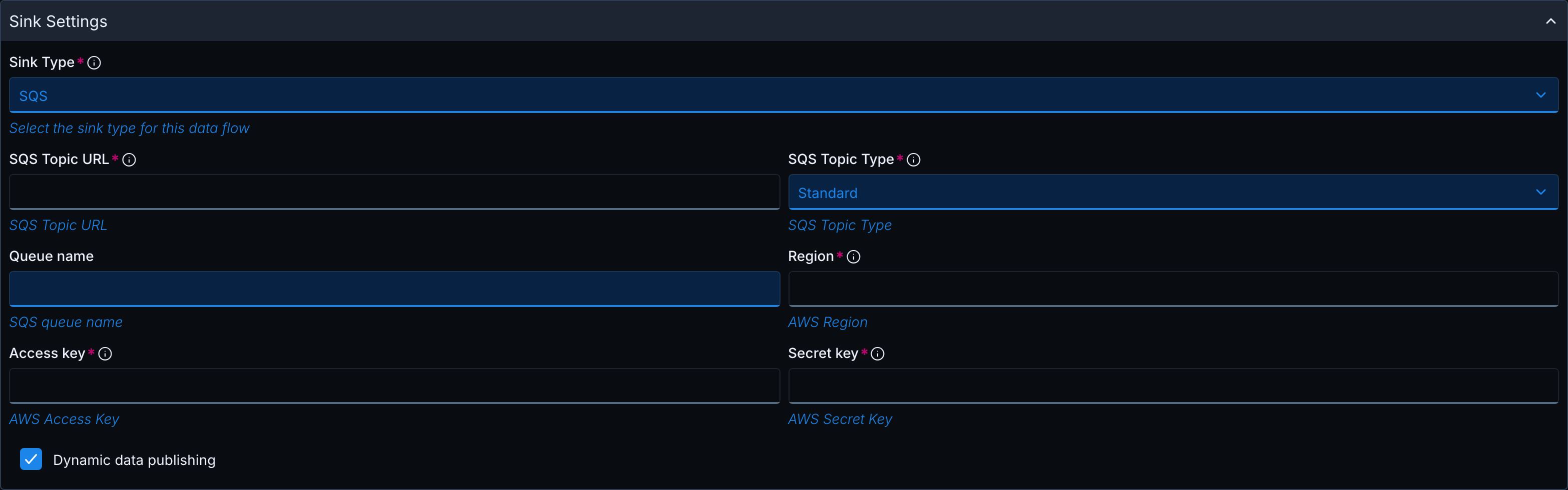
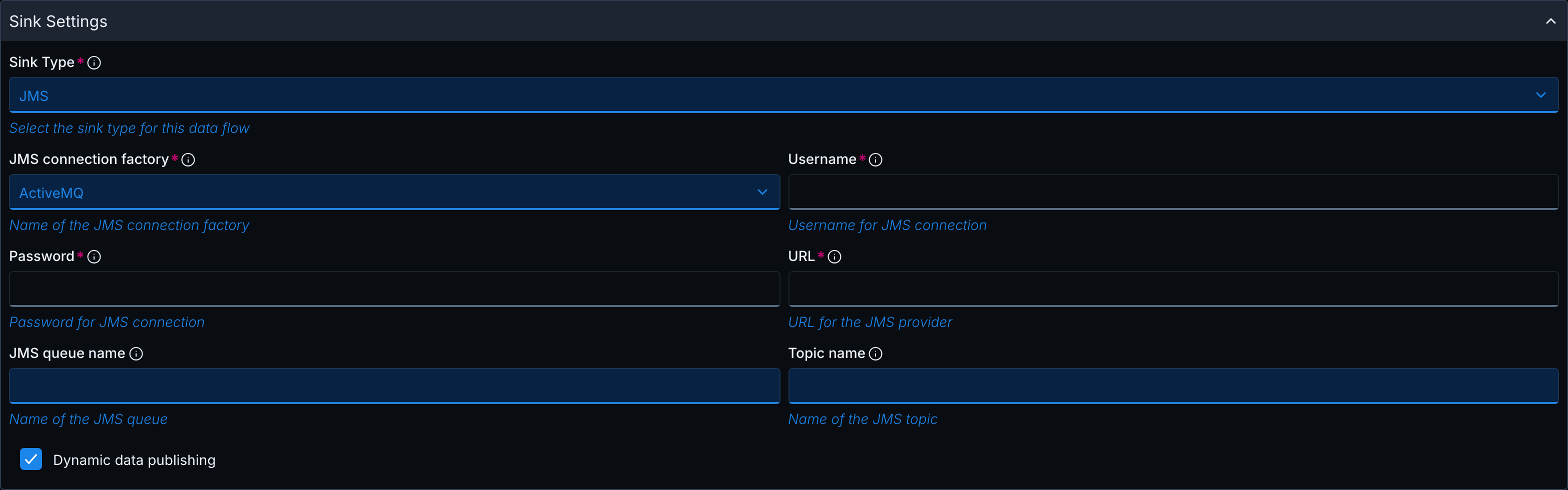
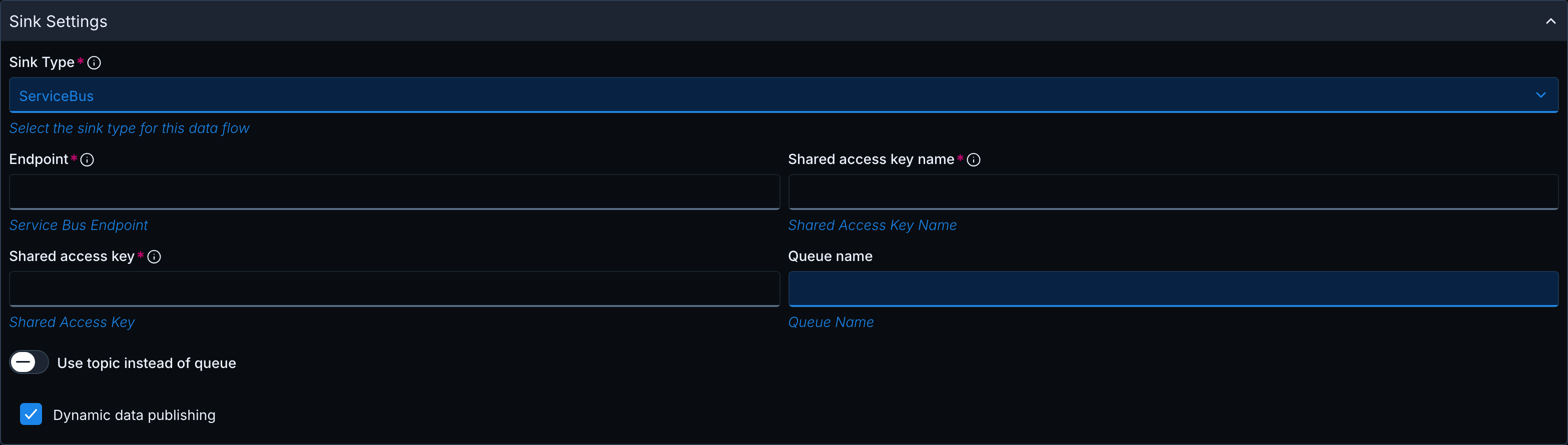
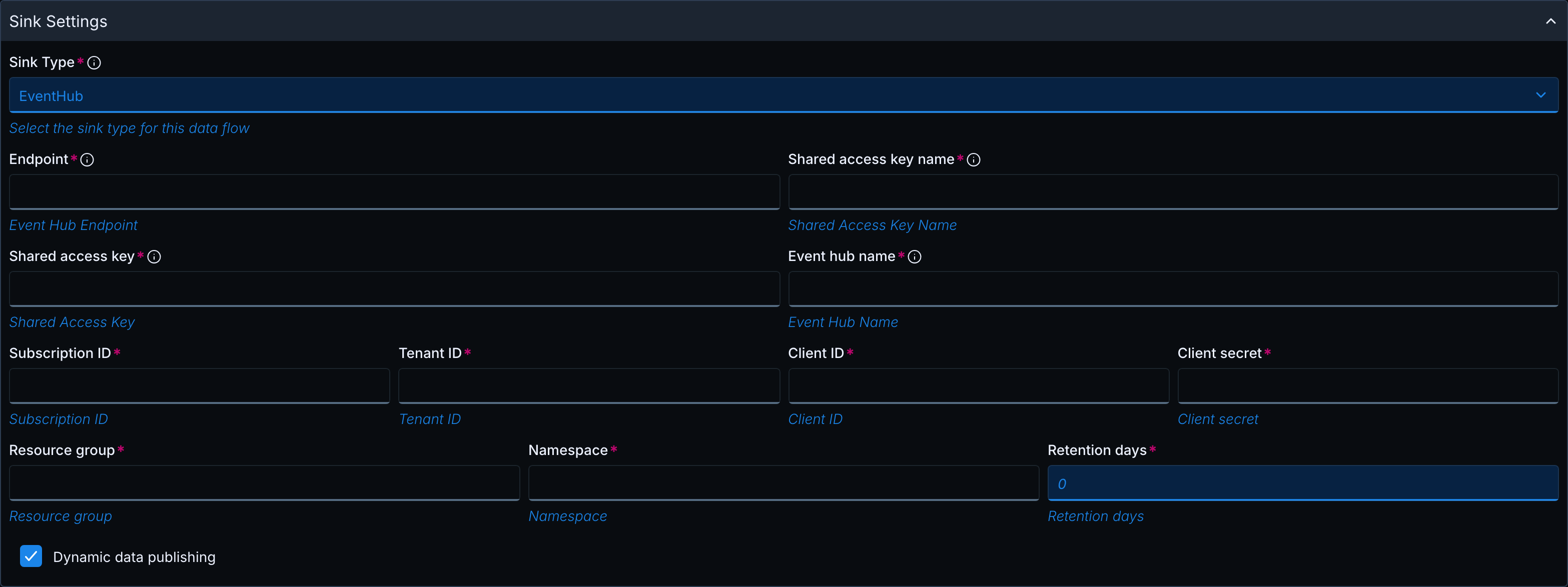
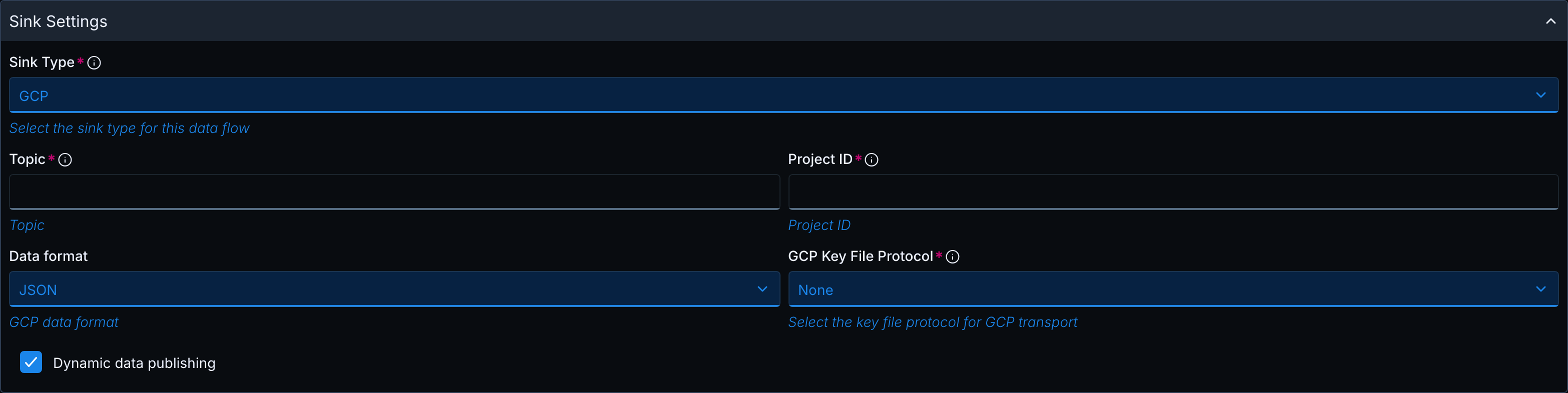
- Select the Dynamic data publishing checkbox at the bottom of the sink form. Some sinks show additional fields.
- Make sure the Data Queue settings point to the InfoCDC data queue and leave the format file fields blank.
- Click Submit.
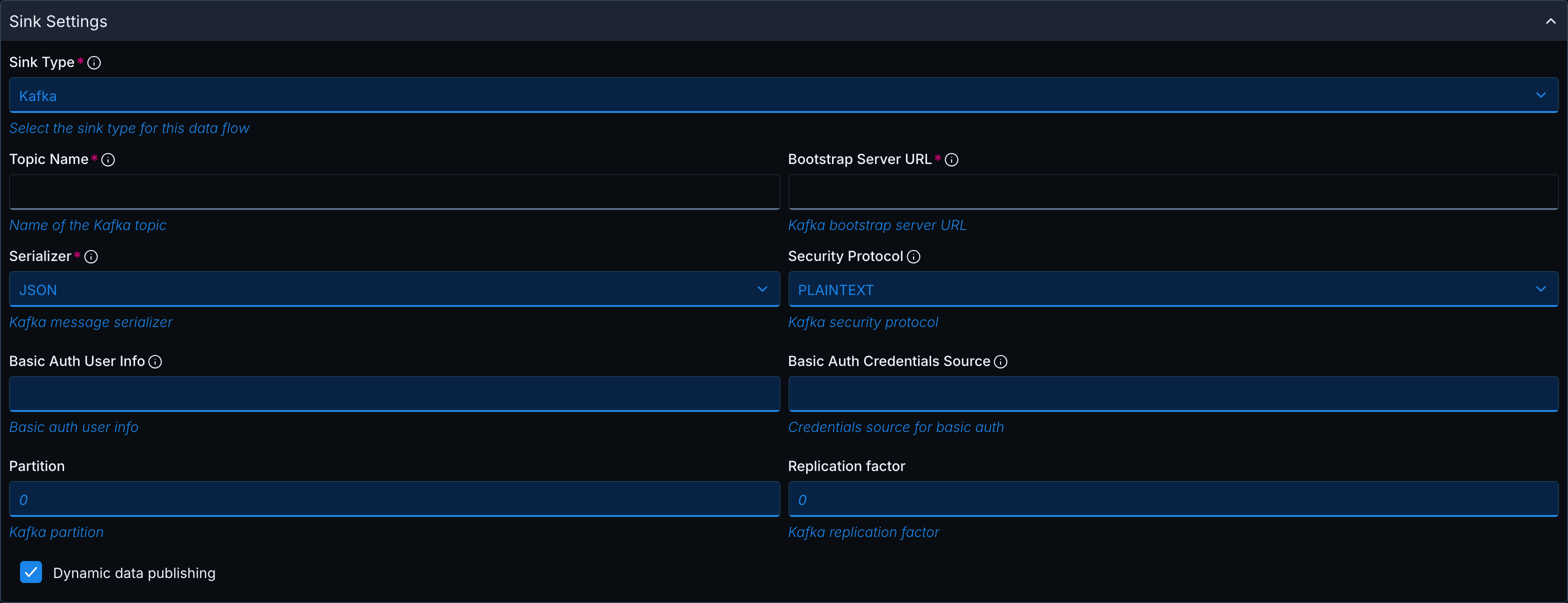
Sink fields that relate to dynamic data publishing:
| Sink | Fields in the form |
|---|---|
| Kafka | Partition, Replication factor |
| AWS SQS | Queue name (name prefix) |
| JMS | Topic name, JMS queue name |
| Azure Service Bus | Queue name, or select Use topic instead of queue and enter Topic name |
| Azure Event Hub | Azure application fields, shown when you select the checkbox (see Azure Event Hub) |
| GCP Pub/Sub | Data format |
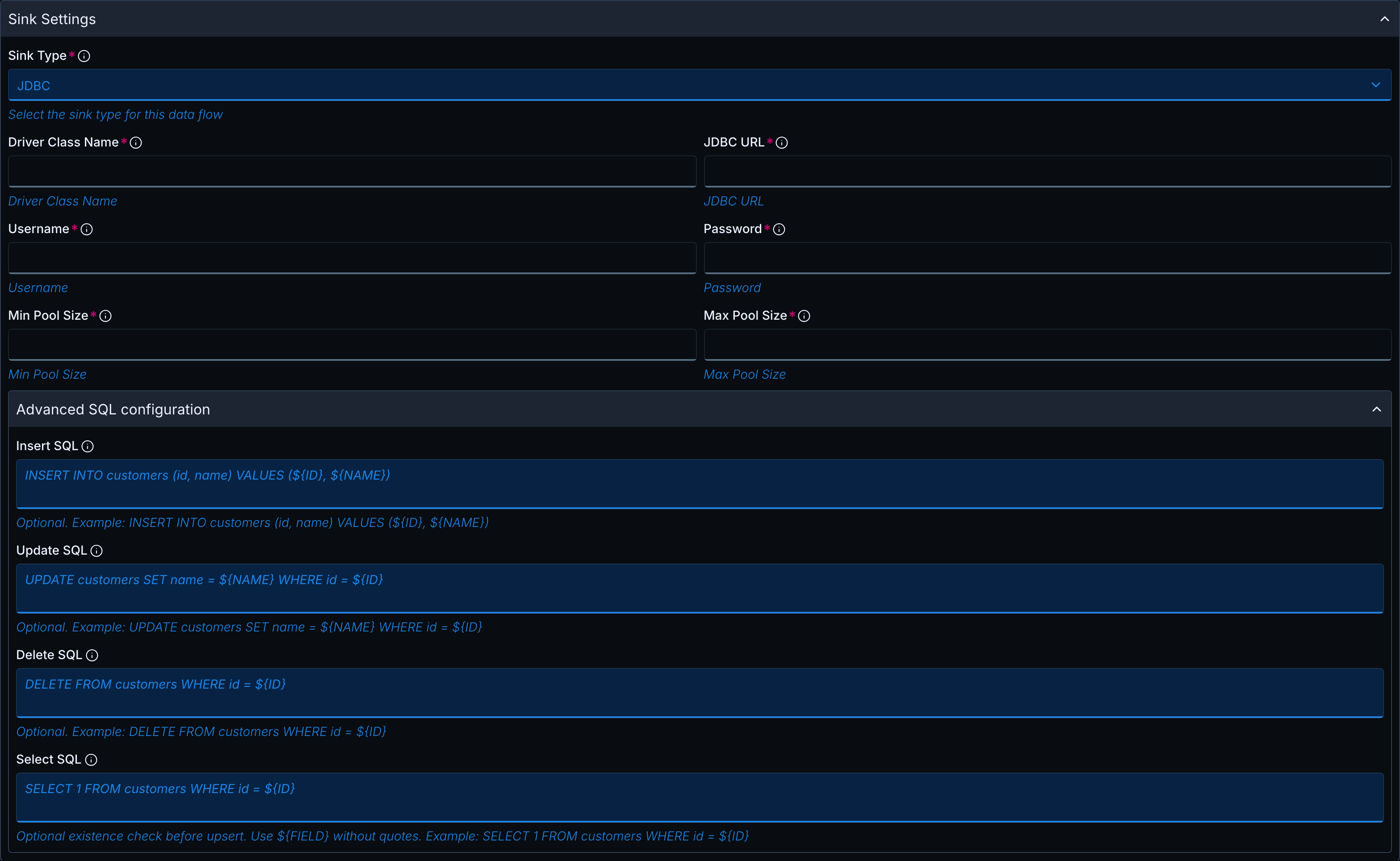
| JDBC | Set the flag in the JSON tab of the form (see JDBC). |
Admin API reference
Create the Data Flow with POST /admin/dqpollers or change it with PUT /admin/dqpollers/{pollerName}. Send the sink settings in sinkTypeProperties, in a properties object named after the sink. Each sink has its own JSON flag:
| Sink | sinkType |
Properties object | Flag |
|---|---|---|---|
| Kafka | Kafka |
kafkaProperties |
dynamicTopicCreation |
| AWS SQS | SQS |
sqsProperties |
dynamicQueueCreation |
| JMS | JMS |
jmsProperties |
dynamicTopicAndQueueCreation |
| Azure Service Bus | ServiceBus |
serviceBusProperties |
dynamicTopicAndQueueCreation |
| Azure Event Hub | EventHub |
eventHubProperties |
dynamicHubCreation |
| GCP Pub/Sub | GCP |
gcpProperties |
dynamicTopicCreation |
| JDBC | JDBC |
jdbcProperties |
dynamicDataPublishing |
All flags are false by default.
Send secrets such as passwords, keys, and client secrets encrypted. See Encrypting credentials. The UI encrypts them automatically.
A Data Flow created without status is INACTIVE. Start it with POST /admin/dqpollers/{pollerName}/start, or send "status": "ACTIVE" as the examples do.
Examples
All examples use the same request body. Only sinkType and sinkTypeProperties change, so the sink examples show only these two fields. Replace the values in angle brackets with your own.
Sample JSON for a complete request body (Kafka)
{
  "pollerName": "cdc-to-kafka",
  "pollerType": "Source",
  "connectionName": "NATIVE",
  "dqName": "CDCDQ1581",
  "libraryName": "INFOCDCDEM",
  "infoCDCConfigured": true,
  "dqFormatFileName": "auto",
  "dqFormatFileLibrary": "auto",
  "dqWaitTime": 30,
  "threadCount": 5,
  "status": "ACTIVE",
  "sinkType": "Kafka",
  "sinkTypeProperties": {
    "kafkaProperties": {
      "topicName": "ibmi",
      "bootstrapServerUrl": "broker1:9092",
      "serializer": "JSON",
      "securityProtocol": "PLAINTEXT",
      "dynamicTopicCreation": true,
      "partition": 3,
      "replicationFactor": 1
    }
  }
}
Kafka
Each record goes to its own topic <topicName>_<TABLE>_<LIBRARY>. topicName is the prefix. A record from HUBTESTS.PLAYERS is published to the topic ibmi_PLAYERS_HUBTESTS.
| Field | Type | Default | Description |
|---|---|---|---|
dynamicTopicCreation |
boolean | false |
Enables per-table topics and topic creation. |
partition |
integer | 1 |
Number of partitions of topics created by the Hub. Must be 1 or greater. The web form defaults to 0, so enter a value when Dynamic data publishing is on. |
replicationFactor |
integer | 1 |
Replication factor of topics created by the Hub. Must be 1 or greater. The web form defaults to 0, so enter a value when Dynamic data publishing is on. |
partition and replicationFactor apply only when the Hub creates a topic.
{
  "sinkType": "Kafka",
  "sinkTypeProperties": {
    "kafkaProperties": {
      "topicName": "ibmi",
      "bootstrapServerUrl": "broker1:9092",
      "serializer": "JSON",
      "securityProtocol": "PLAINTEXT",
      "dynamicTopicCreation": true,
      "partition": 3,
      "replicationFactor": 1
    }
  }
}
AWS SQS
Each record goes to the queue <queueName>_<LIBRARY>_<TABLE>. For FIFO queues, the Hub adds the suffix .fifo. The Hub looks up each queue by name and creates it if it does not exist. A record from HUBTESTS.PLAYERS is published to the queue ibmi_HUBTESTS_PLAYERS.
| Field | Type | Default | Description |
|---|---|---|---|
queueName |
string | none | Required. The queue the Hub publishes to, or the queue name prefix when dynamic data publishing is enabled. |
dynamicQueueCreation |
boolean | false |
Enables per-table queues and queue creation. |
sqsTopicURL remains a required field of the SQS sink form.
{
  "sinkType": "SQS",
  "sinkTypeProperties": {
    "sqsProperties": {
      "sqsTopicURL": "https://sqs.us-east-2.amazonaws.com/012345678910/ibmi",
      "sqsTopicType": "Standard",
      "accessKey": "<encrypted-access-key>",
      "secretKey": "<encrypted-secret-key>",
      "region": "us-east-2",
      "queueName": "ibmi",
      "dynamicQueueCreation": true
    }
  }
}
JMS
Each record goes to the topic <topicName>_<LIBRARY>_<TABLE> and to the queue <queueName>_<LIBRARY>_<TABLE>. The example configures both. A record from HUBTESTS.PLAYERS is published to the topic and to the queue ibmi_HUBTESTS_PLAYERS.
| Field | Type | Default | Description |
|---|---|---|---|
dynamicTopicAndQueueCreation |
boolean | false |
Enables per-table topics and queues. |
topicName |
string | none | Topic name prefix. |
queueName |
string | none | Queue name prefix. |
{
  "sinkType": "JMS",
  "sinkTypeProperties": {
    "jmsProperties": {
      "connectionFactory": "ActiveMQ",
      "url": "tcp://activemq-host:61616",
      "userName": "admin",
      "password": "<encrypted-password>",
      "topicName": "ibmi",
      "queueName": "ibmi",
      "dynamicTopicAndQueueCreation": true
    }
  }
}
Azure Service Bus
Each record goes to the queue <queueName>_<LIBRARY>_<TABLE> or the topic <topicName>_<LIBRARY>_<TABLE>. A record from HUBTESTS.PLAYERS is published to the queue ibmi_HUBTESTS_PLAYERS.
| Field | Type | Default | Description |
|---|---|---|---|
dynamicTopicAndQueueCreation |
boolean | false |
Enables per-table queues or topics. |
queueName or topicName |
string | none | Name prefix. Configure the queue or the topic. |
{
  "sinkType": "ServiceBus",
  "sinkTypeProperties": {
    "serviceBusProperties": {
      "endpoint": "sb://myns.servicebus.windows.net",
      "sharedAccessKeyName": "RootManageSharedAccessKey",
      "sharedAccessKey": "<encrypted-sas-key>",
      "queueName": "ibmi",
      "dynamicTopicAndQueueCreation": true
    }
  }
}
Azure Event Hub
Each record goes to the event hub <eventHubName>_<LIBRARY>_<TABLE> in the configured namespace. The Hub creates missing event hubs through the Azure management API with the Azure application credentials below. A created event hub has one partition and the configured retention period.
The SAS fields (endpoint, sharedAccessKeyName, sharedAccessKey, eventHubName) remain required and are used for sending. eventHubName is the name prefix.
The following fields apply only when dynamic data publishing is enabled. In the UI, they appear when you select Dynamic data publishing, and all of them are required.
| Field | UI label | Encrypted | Description |
|---|---|---|---|
dynamicHubCreation |
Dynamic data publishing | No | Enables per-table event hubs and event hub creation. Default false. |
subscriptionId |
Subscription ID | Yes | Azure subscription that contains the Event Hubs namespace. |
tenantId |
Tenant ID | Yes | Azure AD tenant. |
clientId |
Client ID | Yes | Client ID of the Azure application used to create event hubs. |
clientSecret |
Client secret | Yes | Client secret of that application. |
resourceGroup |
Resource group | No | Resource group of the namespace. |
namespace |
Namespace | No | Name of the Event Hubs namespace. |
retentionDays |
Retention days | No | Retention, in days, of created event hubs. Must be 1 or greater. |
In the Admin API, encrypt the four encrypted fields with POST /admin/encryption, see Encrypting secrets.
A record from HUBTESTS.PLAYERS is published to the event hub ibmi_HUBTESTS_PLAYERS in the namespace myns.
{
  "sinkType": "EventHub",
  "sinkTypeProperties": {
    "eventHubProperties": {
      "endpoint": "sb://myns.servicebus.windows.net",
      "sharedAccessKeyName": "RootManageSharedAccessKey",
      "sharedAccessKey": "<encrypted-sas-key>",
      "eventHubName": "ibmi",
      "dynamicHubCreation": true,
      "subscriptionId": "<encrypted-subscription-id>",
      "tenantId": "<encrypted-tenant-id>",
      "clientId": "<encrypted-client-id>",
      "clientSecret": "<encrypted-client-secret>",
      "resourceGroup": "my-rg",
      "namespace": "myns",
      "retentionDays": 1
    }
  }
}
GCP Pub/Sub
Each record goes to the topic <topic>_<LIBRARY>_<TABLE>_<FORMAT>. With dynamic data publishing off, all records go to the topic configured in topic, without a format suffix. topic is the prefix of the topic names, and projectId is required.
| Field | Type | Default | Description |
|---|---|---|---|
dynamicTopicCreation |
boolean | false |
Enables per-table topics. |
dataFormat |
string | JSON |
Message format: JSON, AVRO or PROTOBUF (upper case). |
Omit gcpKeyFileConfig to use the default Google credentials of the environment.
{
  "sinkType": "GCP",
  "sinkTypeProperties": {
    "gcpProperties": {
      "projectId": "my-gcp-project",
      "topic": "ibmi",
      "dataFormat": "JSON",
      "dynamicTopicCreation": true,
      "gcpKeyFileConfig": {
        "gcpKeyFileProtocol": "FILE",
        "gcpKeyFileName": "gcp_key_file_name.json",
        "FILE": { "filePath": "/opt/infoconnect/keys" }
      }
    }
  }
}
A record from HUBTESTS.PLAYERS is published to the topic ibmi_HUBTESTS_PLAYERS_JSON, and the subscription ibmi_HUBTESTS_PLAYERS_SUBS_JSON is created. With "dataFormat": "AVRO", the topic is ibmi_HUBTESTS_PLAYERS_AVRO, the schema is ibmi_HUBTESTS_PLAYERS_SCHEMA_AVRO, and the subscription is ibmi_HUBTESTS_PLAYERS_SUBS_AVRO.
Topics, subscriptions, and schemas
The first time a record is sent to a topic, the Hub does the following:
- Creates the topic if it does not exist. For
AVROandPROTOBUF, it also creates a schema and attaches it to the topic with binary encoding. - Creates a pull subscription if the topic has no subscription. Topics that already have a subscription are not changed.
The first message to a newly created topic is delayed by several seconds while the Hub waits for the topic and subscription to become available.
| Object | Name with dynamic data publishing on | Name with dynamic data publishing off |
|---|---|---|
| Topic | <topic>_<LIBRARY>_<TABLE>_<FORMAT> |
<topic> |
Schema (AVRO, PROTOBUF) |
<topic>_<LIBRARY>_<TABLE>_SCHEMA_<FORMAT> |
<topic>_SCHEMA_<FORMAT> |
| Subscription | <topic>_<LIBRARY>_<TABLE>_SUBS_<FORMAT> |
<topic>_SUBS_<FORMAT> |
Message formats
| Format | Message content | Schema |
|---|---|---|
JSON |
UTF-8 JSON object. Fields ending in _NULLIND are removed. |
None |
AVRO |
Binary Avro | Avro schema generated from the format file |
PROTOBUF |
Binary Protocol Buffers (proto3) | Protobuf schema generated from the format file |
For AVRO and PROTOBUF, the Hub generates the schema from the IBM i format file of the record. With the format file set to auto, each replicated table uses its own format file, so every topic gets a schema that matches its table. The schema contains the InfoCDC journal columns (such as PROCESSID, SYSTBLNAM, EVENTTYP, JRNSEQNO) followed by the table columns. Columns ending in _NULLIND are not part of the schema.
Type mapping
| IBM i field type | AVRO | PROTOBUF |
|---|---|---|
Binary 8 bytes (AS400Bin8) |
long |
int64 |
Binary 4 bytes (AS400Bin4) |
int |
int32 |
Packed decimal (AS400PackedDecimal) |
double |
double |
Float 4 bytes (AS400Float4) |
string |
float |
Float 8 bytes (AS400Float8) |
string |
double |
| All other types (text, zoned decimal, date, time, timestamp, and so on) | string |
string |
Format details:
- Avro: the record is named
As400JournalRecordin the namespaceinfoview.as400.avro. Every field is nullable (["null", type], defaultnull) and keeps the name from the format file. - Protobuf: the message is named
DynamicMessage. Field numbers start at 1 in the order of the format file. Field names are lower case. Characters other than letters, digits, and_become_, and names that start with a digit get the prefixf_. Null values are not sent.
JDBC
A JDBC sink writes every record into a table named after the source table (SYSTBLNAM, without the library) in the default schema of the JDBC URL, and creates the table if it does not exist. The flag dynamicDataPublishing decides where the column definitions come from:
true, or the format file nameauto: the Hub uses the format file of each record. Every replicated table in the data queue gets columns that match its own format file.- Otherwise: the Hub uses the format file configured in the Data Flow for all tables.
Set dynamicDataPublishing in the JSON tab of the form or with the Admin API. The default format file is auto, so a Data Flow that reads an InfoCDC data queue uses the format file of each record without further settings.
A record from HUBTESTS.PLAYERS is written to the table PLAYERS in the database testdb.
{
  "sinkType": "JDBC",
  "sinkTypeProperties": {
    "jdbcProperties": {
      "driverClassName": "com.mysql.cj.jdbc.Driver",
      "jdbcUrl": "jdbc:mysql://my-database-server:3306/testdb",
      "username": "<encrypted-username>",
      "password": "<encrypted-password>",
      "minPoolSize": 3,
      "maxPoolSize": 10,
      "dynamicDataPublishing": true
    }
  }
}
For the other settings of the JDBC sink, see IBM i Data Replication.
Failure behavior
| Sink | Situation | Result |
|---|---|---|
| Kafka | Dynamic data publishing is off and the topic in topicName does not exist. |
Publishing fails with Failed to verify topic: Kafka topic does not exist and dynamic topic creation is disabled: <topic>. |
| AWS SQS | queueName is empty and dynamic data publishing is on. |
The Data Flow is saved as INVALID with queueName cannot be null or empty when dynamic queue creation is enabled. |
For the states a Data Flow can enter after a failure and how to recover, see Data Flow States and Errors.