API and MCP enablement
This section helps you surface IBM i business logic and data as APIs and as tools for AI agents. The APIs and the MCP server described here are features of InfoConnect Hub. If you build your integrations in MuleSoft, see also InfoConnect for MuleSoft.
The section follows one story: why IBM i needs APIs, which problems they solve, and how to make them work.
Overview
Why do you need APIs and MCP?
IBM i systems hold the business logic and data of the company: pricing rules, order processing, inventory, and customer records. Web, mobile, partner, and AI applications need that logic, but older IBM i programs have no API. Without one, every integration is custom work and depends on scarce RPG and COBOL skills. AI agents face the same barrier: they cannot call business logic that they cannot reach through a standard interface.
What problems does it solve?
InfoConnect makes IBM i business logic and data available through standards-based interfaces, with little or no coding and without changes to your IBM i applications:
- Turn an IBM i program or service program into REST API with no coding.
- Wrap the result of an SQL statement or a stored procedure as a REST API.
- Run IBM i commands and exchange messages with data queues.
- Automate green-screen user actions and surface them as APIs.
- Turn these APIs into MCP tools, so that AI agents discover and run them in AI workflows.
- Reuse each integration. You define an API once and every consumer can use it.
How does it work?
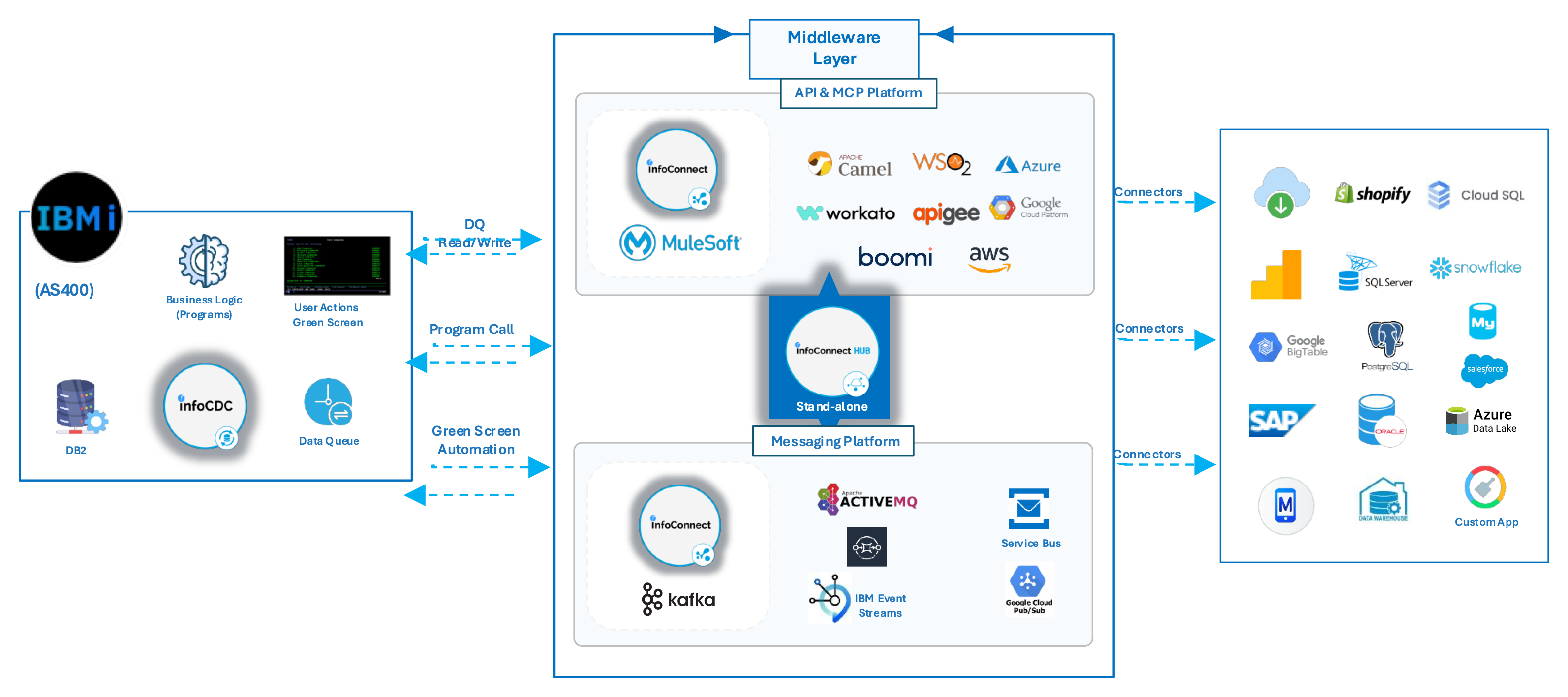
InfoConnect Hub connects to IBM i with a connection that stores the host, the user, and the library list. On top of a connection you define the following APIs:
| API type | What it runs on IBMi |
|---|---|
| Program Call | An IBM i program or service program. The Hub maps the request values to the program parameters. |
| Data API | An SQL statement or a stored procedure. |
| RPA Call | A sequence of green-screen actions. |
The Hub validates each request, runs the call on IBM i, and returns the result as JSON. It generates OpenAPI specifications for the APIs, and its MCP server turns the same APIs into tools for AI agents. The Hub also provides APIs to run commands and to read and write data queues.
If you build your integrations in MuleSoft, the InfoConnect for MuleSoft connector gives your Mule flows the same operations: Program Call, Command Call, Data Queue Read, and Data Queue Write.
Choose your path
| I want to | Use | Guides |
|---|---|---|
| Surface IBM i programs and SQL as REST APIs, without writing code | InfoConnect Hub | Web UI getting started, Managing APIs |
| Let AI agents run IBM i business logic | InfoConnect Hub (MCP server) | AI and MCP tutorial |
| Call IBM i from Mule flows | InfoConnect for MuleSoft | InfoConnect for MuleSoft user manual |
| Run IBM i programs from messages in Kafka | InfoConnect for Kafka (Program Call sink connector) | Program Call sink connector |
| Call external APIs from IBM i | webTF | webTF user guide |
Screen automation APIs
When you can reach the application only through its green screens, and not at program or database level, use screen automation (RPA). The RPA Hub opens a 5250 session, runs the keystrokes that you define, reads the screen into variables, and returns the values as JSON. You call it as an API, and it is also available as an MCP tool.
Next steps
- Follow the quick start to publish your first API and open it to an AI agent.
- Read hardening and scaling before you go to production.
- Use the tutorials and examples for end-to-end scenarios.