IBM i Change Data Capture and Data Replication
Overview
Why do you need change data capture?
Analytical platforms, data warehouses, e-commerce systems, CRM applications, and AI pipelines are only as good as the data they receive. Much of the business data that they need lives in IBM i applications. Batch extracts deliver that data late, and the delay hurts customer experience, process quality, and operational efficiency.
Change data capture solutions that exist for IBM i typically require extensive planning, specialized skills, and a heavy, expensive implementation.
What problems does InfoConnect CDC solve?
InfoConnect CDC is a lightweight change data capture tool that detects and streams data changes from IBM i applications without custom IBM i development. Typical use cases:
- Send order fulfillment status changes from an IBM i ERP or WMS system to a CRM, an e-commerce platform, or third-party partners.
- Propagate product details from an IBM i based ERP to external MDM and PIM solutions.
- Send customer details from an IBM i based solution to an external Customer Data Platform.
- Replicate IBM i data to a data warehouse or a database in near real time.
- Develop a data pipeline for AI model training.
How does it work?
InfoCDC uses the IBM i Db2 journals to receive database changes. It decides, based on filtering rules, whether to send each change to external clients. It streams the changes through IBM i data queues, which are native lightweight messaging queues. A connector or the InfoConnect Hub listens to the data queues and delivers each change to its target.
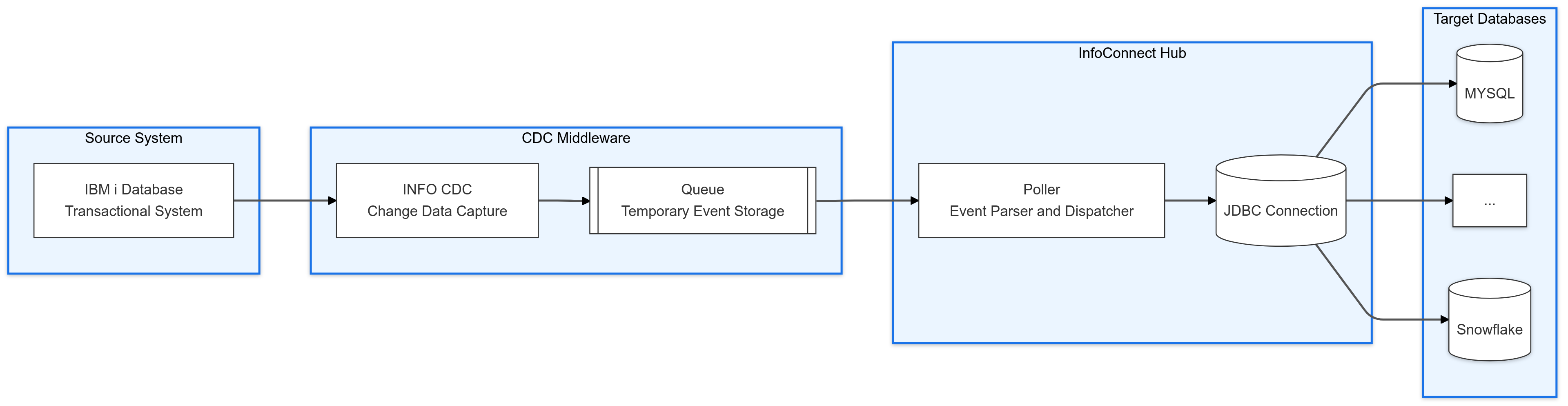
InfoCDC does not poll the journal periodically, so there is no polling interval or delay. Setup is simple: InfoCDC creates the required components, such as data queues, format tables, and flow definitions.
Choose your combination
InfoCDC captures the changes. You choose a consumer that delivers them to your target. Each combination has a guide.
| Combination | Use it when | Guides |
|---|---|---|
| InfoCDC and InfoConnect for Kafka | You operate or plan to operate Kafka and want IBM i changes in Kafka topics and, from there, in downstream targets. | InfoCDC user guide, InfoConnect for Kafka user manual |
| InfoCDC and InfoConnect Hub | You want to replicate directly to a JDBC database, write files to cloud storage, or publish to message brokers, without building Kafka or MuleSoft infrastructure. | InfoCDC user guide, IBM i data replication, File sinks |
| InfoCDC and InfoConnect for MuleSoft | You integrate through MuleSoft and want to process IBM i changes in Mule flows. | InfoCDC user guide, InfoConnect for MuleSoft user manual |
Requirements and considerations
- The minimum supported IBM i OS release level is 7.1.
- All IBM i tables in scope must be journaled with
*AFTERor*BOTHrecord images. With*AFTERimages, delete operations and filtering on specific column changes are not possible. - Each table must have a primary key or a unique key. For legacy files without a key, InfoCDC supports a user-provided composite key.
- Null-capable columns, BLOB columns, and CLOB columns are not supported in the current release.
See the InfoCDC user guide for the complete list.
Next steps
- Follow the quick start to get your first table replicating.
- Read hardening and scaling before you go to production.
- Use the tutorials and examples for end-to-end scenarios.